Can you tell variants apart?
Find missing SKUs and duplicate SKUs or barcodes that make identification harder.
Inventory data auditing for Shopify
Missing costs. Duplicate identifiers. Inventory settings that do not match the product. StockHealth brings these inconsistencies into view—so you can review the evidence, organize corrections and keep your catalog data reliable.
Better decisions need reliable inputs
Find missing SKUs and duplicate SKUs or barcodes that make identification harder.
See missing or zero costs, zero prices and prices below recorded unit cost.
Spot physical items whose inventory is not tracked, and check whether that choice is intentional.
Recheck the catalog after editing and distinguish verified corrections from intentional exceptions.
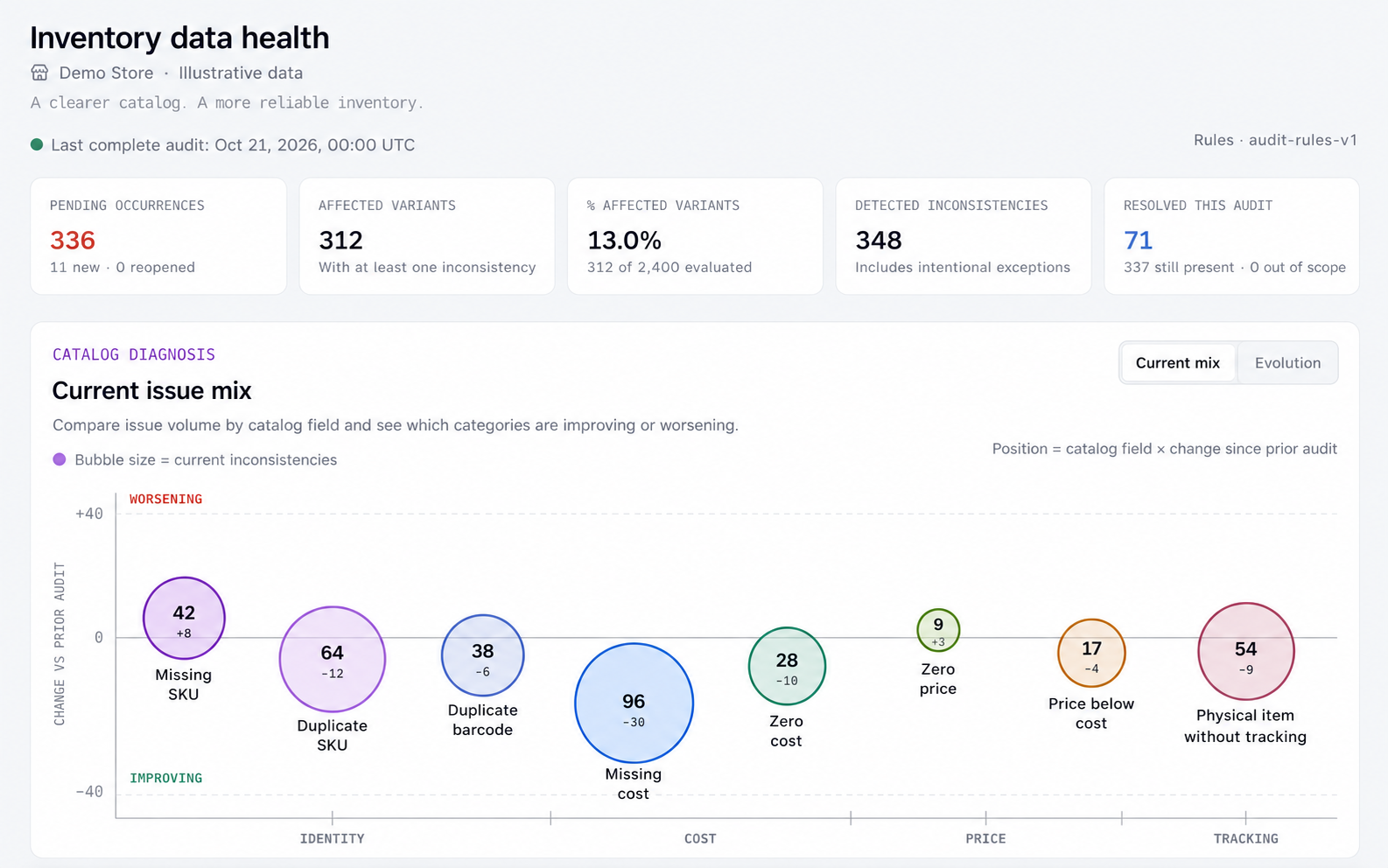
Catalog diagnosis
Review pending occurrences, affected variants and corrections confirmed by the latest complete audit. The issue map shows where inconsistencies are concentrated and which categories are improving or worsening.
One variant can have more than one issue. StockHealth keeps variant counts separate from occurrence counts, and intentional exceptions remain visible in detected totals.
Eight focused checks
StockHealth checks the catalog fields that support identification, cost visibility and inventory tracking. Each finding comes with evidence to review—not an assumption that every exception is a mistake.
Variants without an SKU to support consistent identification.
The same SKU used by multiple variants.
Repeated barcodes that deserve a closer look.
Variants with no recorded unit cost.
A recorded cost of zero, kept separate from missing data.
Variants priced at zero, for review in their business context.
Price below recorded unit cost in the same currency. This is not a net-profit calculation.
Physical items with inventory tracking switched off.
Task center
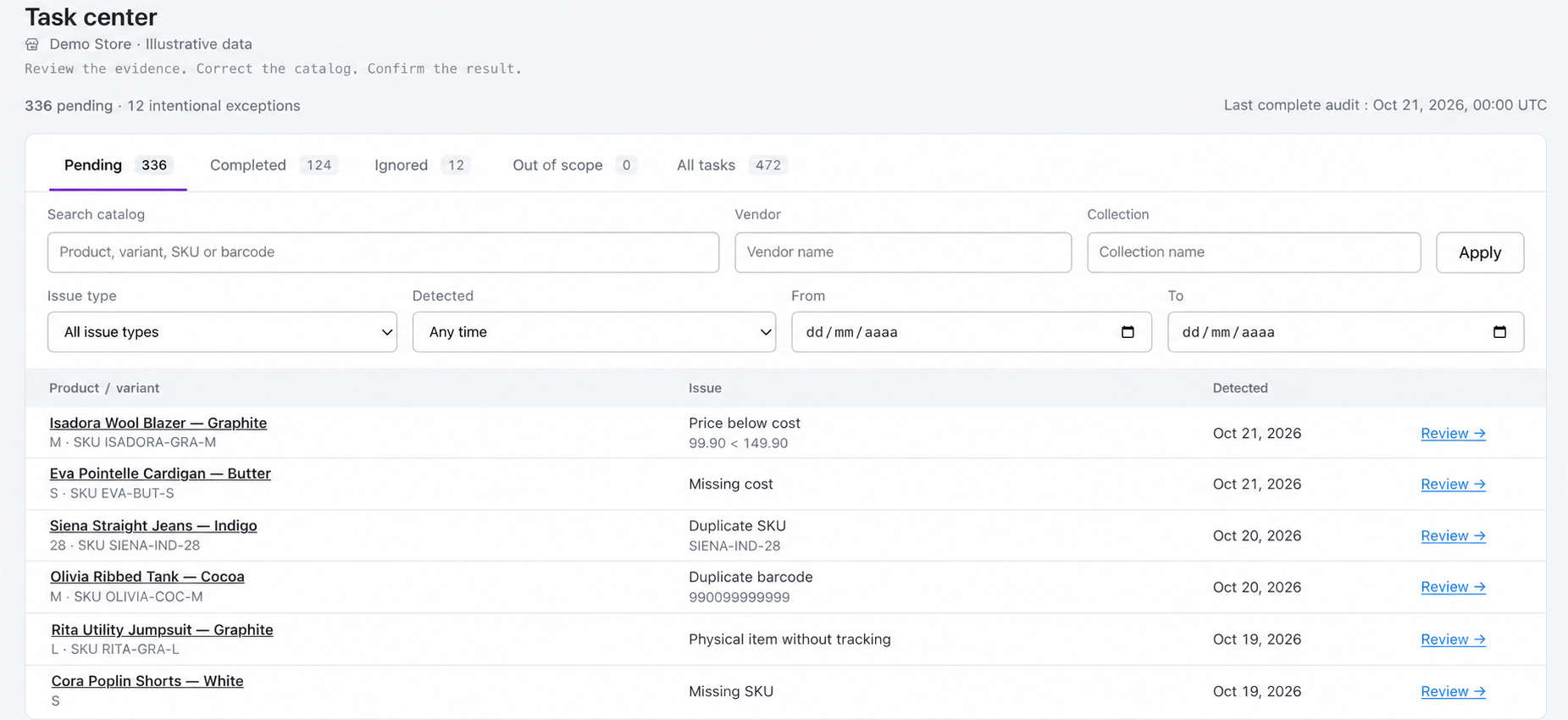
Work through a queue of affected variants. Search the catalog and narrow your review by issue type, vendor, collection or detection date. Separate pending work, completed tasks, intentional exceptions and items that left the audit scope.
Open a finding to understand the evidence, then go directly to the product in Shopify. The catalog stays under your control.
Evidence and verification
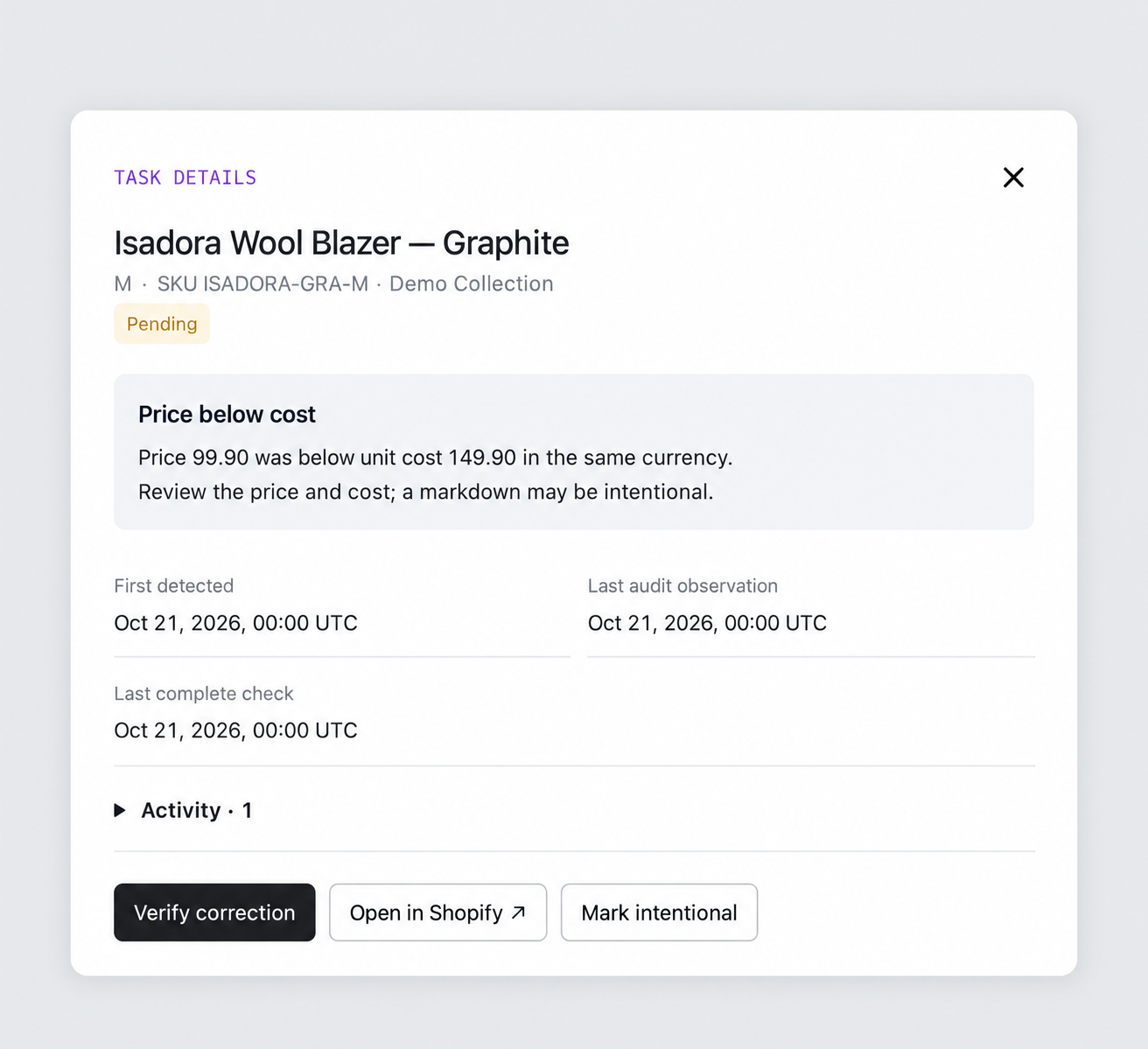
Inspect the field values behind a finding. Make the appropriate change in Shopify, then use Verify correction to request a recheck.
A task is completed only when the check confirms that its inconsistency is gone. If a price reduction or other exception is deliberate, use Mark intentional instead.
Review the evidence.
Make the decision.
Confirm the result.
History and daily monitoring
Daily audits run in the store’s timezone. Review completed audit history and the evolution of detected inconsistencies, rather than relying on a one-off cleanup.
New issues, reopened occurrences and confirmed corrections tell different stories. So do items that leave the audit scope: archiving or deleting a variant is not counted as a correction.
Overview charts reflect completed audit snapshots. Task actions can be more recent than the latest chart snapshot. Partial coverage is identified when the catalog exceeds the plan’s variant limit.
Weekly notifications · Coming soon
Bring catalog health into your team’s weekly routine. Planned email and Slack summaries will help your team follow new issues, confirmed corrections and the work that still needs attention.
Choose up to three email recipients per store for the weekly catalog health summary. Keep the people responsible for your catalog informed.
Connect Slack and select a channel for completed weekly reports. Give your team a shared place to follow catalog health and plan the next review.
Planned summaries cover new and reopened issues, confirmed corrections and pending work, with a link to the task center. Partial audit coverage will be identified.
How it works
StockHealth evaluates active and draft variants within your plan’s capacity. Archived variants are excluded.
See the issue mix, inspect affected variants and decide which records need correction or an intentional exception.
Edit in Shopify, request verification and use daily audits to follow the health of the catalog over time.
Simple catalog-based pricing
Every plan includes the same audit features. Choose capacity by the number of active and draft variants—not revenue and not a feature checklist.
$0
Up to 500 variants.
All audit features included.
$2.99/month
Up to 2,000 variants.
All audit features included.
$4.99/month
Up to 5,000 variants.
All audit features included.
$9.99/month
Up to 10,000 variants.
All audit features included.
Custom capacity is available by agreement. Contact us for a quote.
Prices in USD, billed monthly for paid plans. If your catalog exceeds your plan’s limit, audit coverage is partial and clearly identified. StockHealth does not automatically upgrade your subscription. A downgrade does not erase audit history.
StockHealth audits catalog data. It does not count physical stock, forecast demand, place orders or automatically edit your catalog. You decide what to change and which exceptions to keep.
StockBeat is a separate, optional product for inventory intelligence and replenishment decisions. StockHealth does not require it.
Read the FAQ ↗Early access privacy notice ↗A clearer catalog. A more reliable inventory.
Find inconsistencies, review the evidence and build a repeatable catalog health routine.
Request early access